



Keyword research is a primitive part of search engine optimization (SEO) that helps websites rank higher in search engine results pages. There are multiple tools available to offload the keyword research burden, and the seoMoz keyword tool is one of the top of these.
Moz’s keyword research tool, also known as Moz Keyword Explorer, comes with all the necessary features you need to conduct detailed and effective keyword research for your website content. It’s a very easy-to-use tool, and you start researching with it right away.
In this article, I am going to discuss a detailed guide on how you can use Moz SEO for effective keyword research. Let’s start.
What is Moz Keyword Explorer?
Moz Keyword Explorer is an online SEO tool that allows you to conduct effective keyword research. It allows Search Engine Optimization experts to find keywords that are suitable for ranking content higher in search engine results.
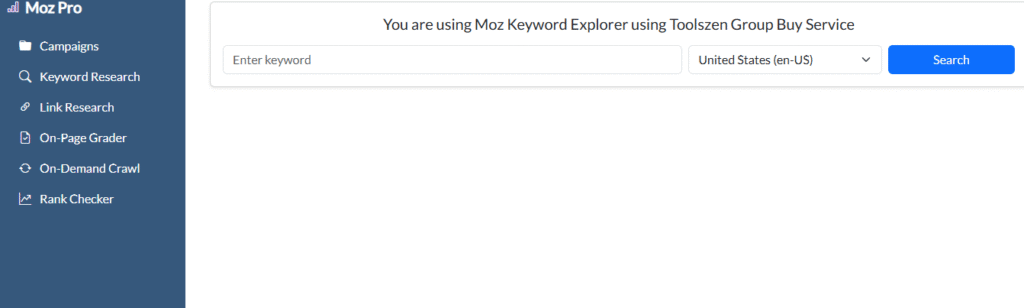
It is a free keyword research tool with simple features. You can enter your main idea here, and it will fetch all the relevant keywords that are highly searched on the Internet.
With SEO Moz Keyword generator, you can also select the region/location of keywords to create more precise content for a specific target audience.
Features of Moz Keyword Explorer
Keyword Search and Suggestions
The core feature of Moz Keyword Explorer lets you enter any seed keyword and instantly get a list of up to 1,000 related keyword suggestions.
Each suggestion comes loaded with metrics like search volume, keyword difficulty, and organic CTR so you can evaluate them without switching tools.
Keyword Metrics
For every keyword you analyze, Moz provides the following data points:
- Search Volume shows the estimated number of times a keyword is searched per month.
- Keyword Difficulty scores how hard it is to rank on Page 1 for that keyword, on a scale of 0 to 100.
- Organic CTR estimates what percentage of searchers actually click on organic results rather than paid ads, map packs, or featured snippets.
- Priority Score combines search volume, keyword difficulty, and organic CTR into a single score from 0 to 100, weighted against your site’s current authority. It tells you at a glance which keywords are worth pursuing without manually comparing three separate numbers.
Keyword Lists
Moz lets you save keywords into organized lists directly inside the platform. This is a paid feature. Free users can research keywords but cannot save or export them, which makes list management exclusive to Moz Pro subscribers.
SERP Analysis
When you analyze a keyword, Moz shows you the top 10 pages currently ranking for it along with their Domain Authority and Page Authority scores. This tells you how strong your competition is for that keyword before you decide to target it.
Rank Tracking
Moz Pro lets you track where your website ranks for specific keywords over time. You can monitor both local and national search results and see ranking movement month by month. This is a paid feature available on all Moz Pro plans.
Site Audit
Moz Pro crawls your entire website and identifies technical SEO issues such as broken links, missing meta descriptions, slow page speed, and crawl errors. Fixing these issues helps search engines index and rank your content properly. This is a paid feature.
On-Page Grader
After publishing a page targeting a specific keyword, the On-Page Grader scores how well that page is optimized. It checks your title tag, headers, keyword usage, meta description, and internal links, then tells you exactly what to improve. This is a paid feature.
MozBar
MozBar is a free browser extension that overlays Domain Authority and Page Authority scores directly on Google search results as you browse. It is useful for quickly sizing up competition without logging into Moz Pro. It works on the free plan.
Why Use seoMoz Keyword Research Tool?
seoMoz Keyword Research Tool checks multiple ranking factors and provides deep insights into search queries. Unlike other tools, it doesn’t focus solely on search volume but offers a special approach to grab keywords and here it is:
- Check how hard it is to rank for a keyword in search results (Keyword Difficulty).
- Figure out how many possible users will click on the organic results (CTR).
- Check out if the specific keyword is informational, navigational, or commercial (Search Intent).
- Inspect competition analysis in Google’s search results and find keywords on which your competitors are ranking.
These features of Moz help users refine their Keyword research strategy with data-centric insights.
How to Use Moz Keyword Research Tool for Free?
If you are on a budget, you can use the free version of the keyword research seoMoz tool.
Here are steps to find seoMoz keywords with its free version:
Step 1: Create a Moz Account
First, visit the Moz keyword explorer tool and create a free account if you don’t have one. The free version allows 10 keyword queries per month, with no option to save keyword lists or export data.
Step 2: Enter Your Target Keyword
Type your desired keyword into the search bar (e.g., “best SEO tools”) and then click on the Analyze button to see seoMoz keywords stats.
Step 3: Study Your Keyword Stats
Each of these stats has its specific purpose, therefore study those stats in-depth. For instance, the keyword difficulty metric shows how hard it is to rank for a keyword. The search volume stats tell the estimated number of searches per month. Similarly, the organic CTR indicates the percentage of clicks that go to organic search results.
Step 4: Secondary Keywords
Moz provides a list of related or secondary keyword suggestions. You can use these keywords to optimize your content for MozSEO best practices.
Step 5: Get Keywords
Copy relevant keywords and related ones for later use. It’s important to note that, the free version allows only limited keyword export. So, you can note down the valuable keywords by yourself.
Pro Tip: Use your 10 free monthly queries on your most competitive seed keywords first. This gives you the difficulty and CTR data you need to decide whether to invest in a paid plan before committing.
A Step-by-Step Guide to Using SEOMoz Keyword Explorer for SEO:
Conducting Search Engine Optimization requires comprehensive keyword research so that your content can rank higher on Google results. Moz makes it a lot easier to conduct this research. Now that we have discussed the using method of this tool, let’s focus on how to actually conduct keyword research with it.
Start with a Goal:
I suggest starting your research process with a clear goal. Keyword research in itself is a huge domain. It has different angles, types, and purposes. Starting without a clear goal will confuse you, and you will end up conducting useless research.
Here’s what you need to do:
- Clarify the intent of your content.
- Define what type of target audience you’re trying to hit.
- Define the exact niche and sub-niche of your content.
Begin with a Seed Keyword:
Start the research process with a seed keyword (main keyword). For example, if you’re going to write about AI tools, enter keywords like:
- AI tools
- AI writing tools
- AI chatbots
… or any other relevant tool that you’re going to write about. After you enter these words, Moz’s Explorer will generate all the keywords relevant to the seed words.
Before building your keyword list, it is worth checking which keywords your website already ranks for. Targeting a keyword you already rank for on Page 1 splits your own efforts and can hurt both pages — this is called keyword cannibalization.
In Moz Pro, you can do this by going to Ranking Keywords under the Keyword Research section and entering your own domain. Export the list and keep it as a reference so you only target new opportunities.
Analyze Important Metrics:
Analyzing important metrics is the backbone of the whole keyword research process. It’s because not every keyword is suitable for use in your content. You need to target specific words according to specific metrics.
For example, if you’re trying to rank on a main keyword that has a huge competition, you should focus on relevant long-tail keywords that have low keyword difficulty.
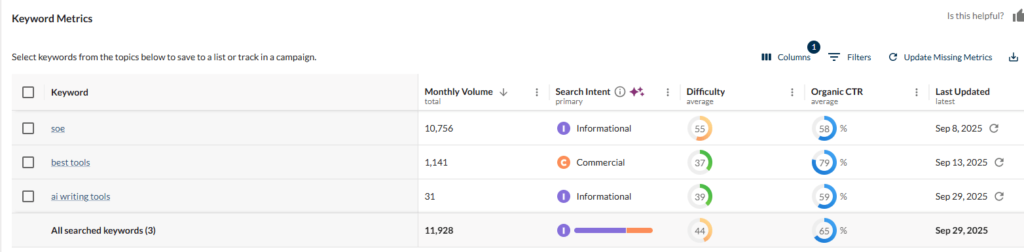
Similarly, if a word has high search volume but low CTR (Click-Through rate), it may not give you the required amount of traffic since people might be clicking on paid ads and snippets. In this case, focusing on a word with low traffic but high CTR could be beneficial.
Some important metrics you should focus on while using Moz Keyword Explorer are:
- Search volume
- Keyword difficulty
- Organic CTR
- Search intent
- Priority score
Analyze your Competitor:
If you’re using Moz Pro, you will be able to conduct a competitor analysis for better keyword research. Competitor analysis helps you analyze what type of keywords your competition is using.
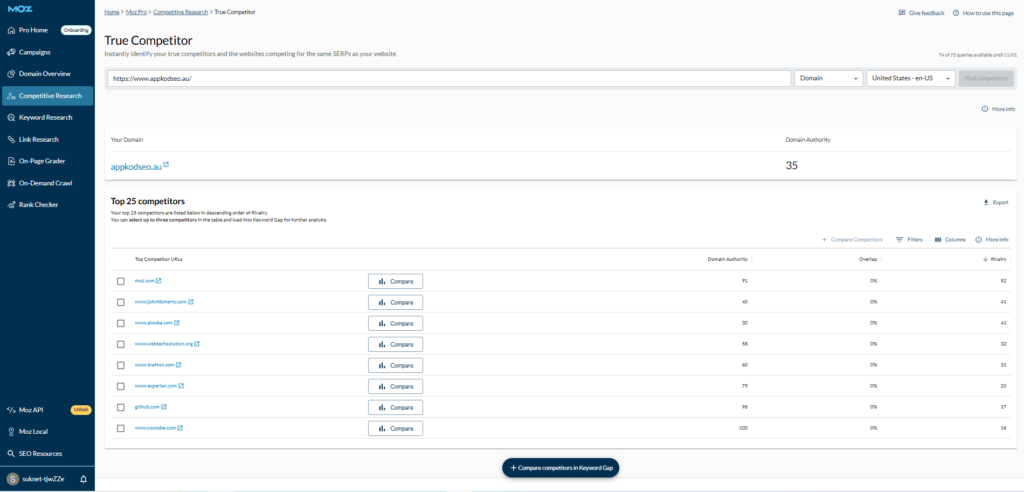
You can use these keywords to build a better SEO strategy to outrank the competition easily.
Use Keywords Strategically:
Having high-quality keywords isn’t the only thing you need for better SEO. The real game is using these keywords strategically. Using all the words in your content without any strategy can actually harm your SEO.
To avoid this, you need to place keywords in a natural position without any forcing. Natural placement keeps the content genuine while making it SEO-friendly at the same time.
Monitor Keywords and Update Content:
The performance of keywords doesn’t remain the same all the time. It keeps changing with search trends and user behavior.
So, it is important that you keep on monitoring relevant content every now and then. Whenever any keyword gains search volume, try to update your content by adjusting this keyword. It will refresh your content while increasing the chances of gaining a better ranking.
How to Measure the Results of Your Keyword Research
Doing keyword research is only half the work. Once you have published content targeting your chosen keywords, you need to track whether it is actually performing. Here are the key metrics to monitor:
Organic Traffic:
Track how many visitors are arriving at your pages through search engines. A steady increase after publishing optimized content is a sign your keyword targeting is working. Use Google Search Console or Google Analytics alongside Moz for this.
Keyword Rankings:
Use Moz Pro’s Rank Tracking feature to monitor your position for each target keyword over time. Rankings fluctuate, so check monthly rather than daily.
Organic CTR:
A page ranking on Page 1 but getting low clicks may have a weak title tag or meta description. Google Search Console shows your actual CTR per keyword, which tells you whether the page needs on-page improvements even if it ranks well.
Bounce Rate and Time on Page:
If visitors land on your page and leave immediately, it means the content is not matching their search intent even if the keyword is right. Revisit the intent type and adjust your content accordingly.
Moz Premium Pricing:
Moz Pro offers four paid plans. Prices below are on monthly billing. Annual billing reduces each plan by approximately 20%.
- Starter: $49/month — best for individuals managing a single website. Includes basic keyword research, rank tracking, and site audit.*
- Standard: $99/month — suitable for those new to SEO who need foundational tools across multiple projects.
- Medium: $179/month — the most popular plan for businesses and marketers running active SEO campaigns. Unlocks higher keyword query limits, more tracked keywords, and larger site crawl budgets.*
- Large: $299/month — designed for agencies and teams managing multiple client sites at scale.
All plans include a 7-day free trial. There is no permanent free plan, but the free version of Moz Keyword Explorer gives you 10 keyword queries per month without a subscription.
Benefits of Using seoMoz Keyword Tool
Here are the key benefits of extracting keywords using seoMoz:
- The Moz keyword research guide provides precise data, which makes it easy to find high-value keywords.
- Both the free and premium versions of MozSEO have a simple interface. This makes the keyword research process smooth.
- With the seoMoz keyword research tool, you can check competitor rankings and optimize your content accordingly.
- The Moz check keyword by clicks. So, this feature helps you assess how often people click on specific keywords.
- Also, the Moz blog keyword research helps you see new SEO keyword research trends and tips. These insights help refine your SEO approach to target low-difficulty, high-traffic keywords.
Conclusion
It is important to know how to do keyword research and use Moz keyword research tool to uplift your website’s search ranking. No matter, whether you use its free or subscribed version, it helps you pick competitive keywords with low difficulty and high volume.
Furthermore, if you have a keyword list, you can check them one by one with seoMoz keyword research to check their competition level. Besides, you can have your hands on SERP analysis to check the sites of your competitors.
